

Forty years ago, pretty much all data resided in the walled garden of the mainframe, bar a few upstart midrange platforms. Most of that data was also human-generated and stored in traditional structured databases. Today, the data landscape is more diverse than ever, creating both opportunities and challenges for businesses to manage their digital assets.
Background
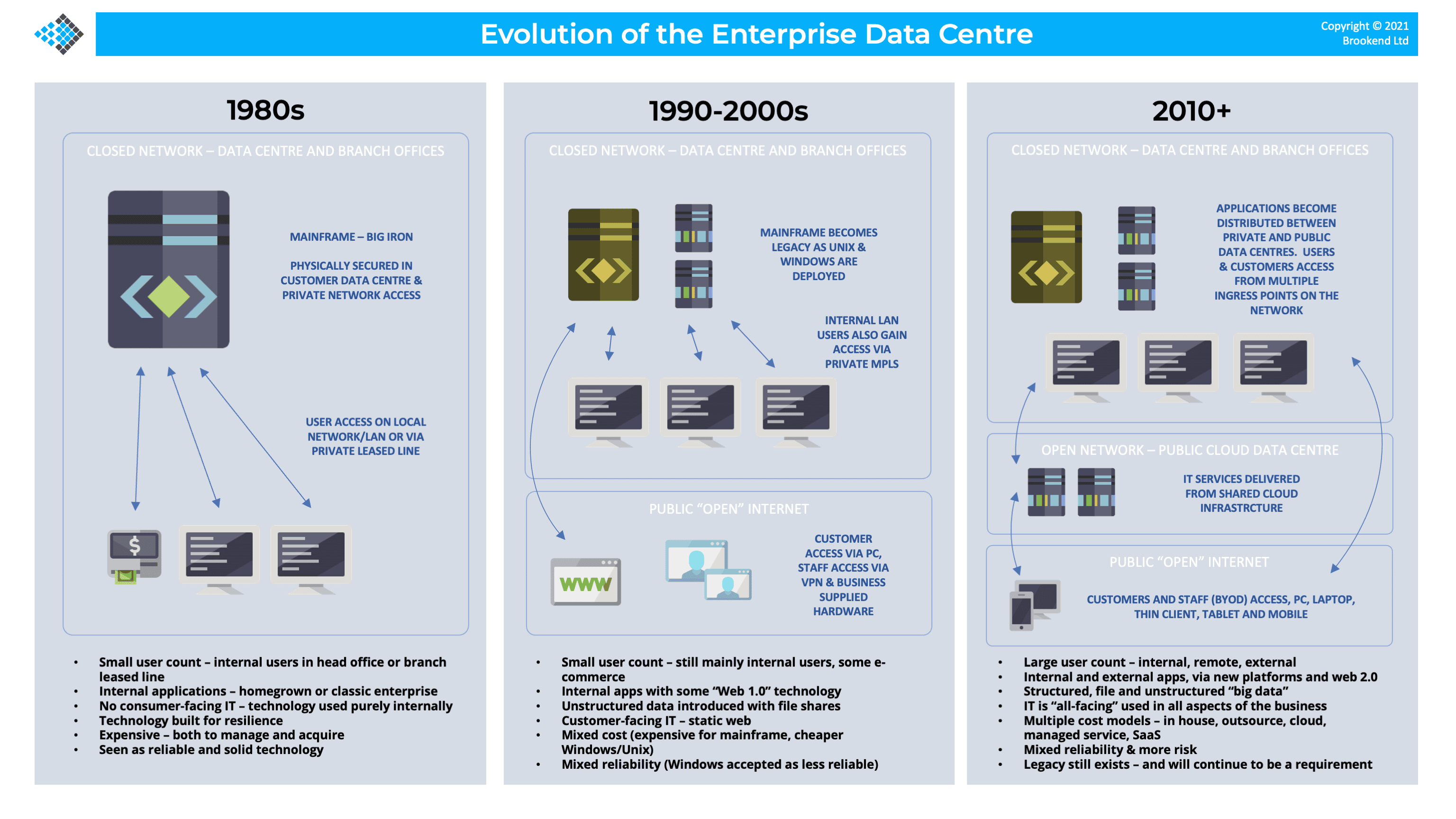
The history of data has been tightly coupled with the evolution of technology platforms since the dawn of computing in the late 1940s. In the 1960s when mainframes ruled the world, for example, data was safely locked up in proprietary systems in corporate data centres. Although outsourcing existed (similar to today’s cloud computing), the multi-tenant nature of mainframe systems allowed data to be kept secure for each customer.
This process was both physical and logical in the sense that the data resided only on physical disk systems in secure facilities or on magnetic media. Ubiquitous networking simply didn’t exist. Access to mainframes was through secure terminals, point-to-point networking and possibly dial-up modems. As a result, mass exfiltration of data was practically impossible to achieve.
Midrange
As the influence of the mainframe waned in the 1980s, departmental or midrange systems emerged, moving some data out of the rigid structures of the secure enterprise data centre and into computer rooms or smaller facilities. Some of this change was driven by the dispersed nature of IT for retail and financial organisations. Departmental systems enabled computing to be closer to the end user, with links back to the “mother ship” in traditional data centre designs.
As networking became more open (driven by the expansion of the Internet), it was possible to log into remote systems across continents. Security (especially in academic circles) was generally much laxer compared to today’s standards, as highlighted in the 1989 book “The Cuckoo’s Egg” by Clifford Stoll.
Side Note: At university in the mid-1980s, I managed to log into many US academic institutions from my computing lab at Leeds University. Most of these systems had no password set for basic Telnet access, making it possible to log in and look around.
The adoption of midrange technology was arguably the beginning of computing “democratisation”, where any company (and eventually any individual) could own a computer system, but also became responsible for the protection of data and the security of their infrastructure.
PC Technology
The diversification of computing power continued into the 1990s with smaller, cheaper and more efficient hardware. Servers (particularly tower designs) could reside under a desk and didn’t need specific power and cooling capabilities. Expensive workstations and dumb terminals were replaced by desktop PCs running Windows, some of which used emulation software to talk to the mainframe (remember Rumba, anyone?), while other applications began the transition to the Internet we know today.
The PC revolution put computing into the hands of any individual, once again increasing the diversification of data assets onto a wider range of disparate platforms. Theoretically, business data should be stored on centralised storage systems, but we all know from personal experience that many critical files, such as Word documents and spreadsheets, are frequently stored locally. This causes issues of data security, data concurrency (multiple slightly different versions) and data loss.
Mobile Technology
As the new millennium dawned, we experienced the emergence of mobile devices as the next wave of computing. Early mobile devices offered some local data capability and many of the advancements in the 2000s were driven off the back of the dot-com boom and rise of the World-Wide Web.
In addition to desktops, businesses could now operate remotely, with increasingly lightweight mobile laptops and tablets (pioneered by Apple in the late 2000s) and then with smartphones (arguably becoming mainstream with the iPhone 3G in 2008).
The smartphone revolution is interesting in that it triggered the development of thousands of dedicated applications (or just “apps”), each of which communicates with centralised computing infrastructure but can store data locally. This design is reminiscent of the “dumb terminal” days of the mainframe, albeit with a much more advanced mode of operation.
Side Note: in the early days of the iPod Touch in 2007, most of the apps were just browser-based encapsulations and required an Internet connection to work.
Edge
Another aspect of mobile computing is the development of edge solutions. In reality, edge computing has existed for decades. Think of POS (Point-of-Sale) terminals, advertising kiosks, cash machines and similar devices that push computing to the edge. These systems are important because many are not just consumers of data (like an advertising hoarding) but generate critical data that needs to be stored and managed – a topic we will discuss in a moment.
The Public Cloud
As the mobile revolution was just getting started, the mid-2000s saw the beginning of the cloud era. From the first object storage solution introduced in 2006, Amazon Web Services (AWS) kick-started the transformation of IT towards a cloud model, which today operates in public, private and hybrid modes. Initially, public cloud capabilities were based on service offerings that looked like traditional infrastructure (virtual servers, storage, networking) but have increasingly diversified into bespoke applications that address specific business needs or embrace new technologies like artificial intelligence.
Despite their best efforts, the public cloud has not come to dominate all of IT, but instead we now see an equilibrium of the hybrid model, where some applications reside on-premises, some in the cloud and some span both locations. This is especially true for data behind these applications, which can exist in many places.
Software-as-a-Service
One final development to discuss is software-as-a-service or SaaS. The term SaaS doesn’t accurately define modern applications that can be accessed through a web browser or custom app. While these solutions are “software on demand”, they are better described as “application-as-a-service”, as many replace traditional tools and solutions installed locally, either in the data centre or on consumer devices.
The use of SaaS has exploded in recent years, driven by the ability for anyone to create and develop software using the public cloud, with few barriers to entry and a predictable cost model for the business. Contrast this to the late 1980s, when buying time on a mainframe was prohibitively expensive for all but the biggest software houses.
As a result, we have SaaS offerings for almost every conceivable task, from business-related CRM to accounting packages, time management, project planning, email and productivity tools. On our personal devices, we have social media, email, health and fitness tracking, and eBooks, to name but a few.
Data shows there could be 30,000 or more SaaS applications in the global marketplace, with a typical company using up to 200 services but wildly underestimating the number of SaaS offerings actually being used by the business (typically by a ratio of 10:1).
SaaS has become as important to businesses as traditional applications or the public cloud but has one distinct difference – data ownership and accessibility, which we will cover in a moment.
Diversity
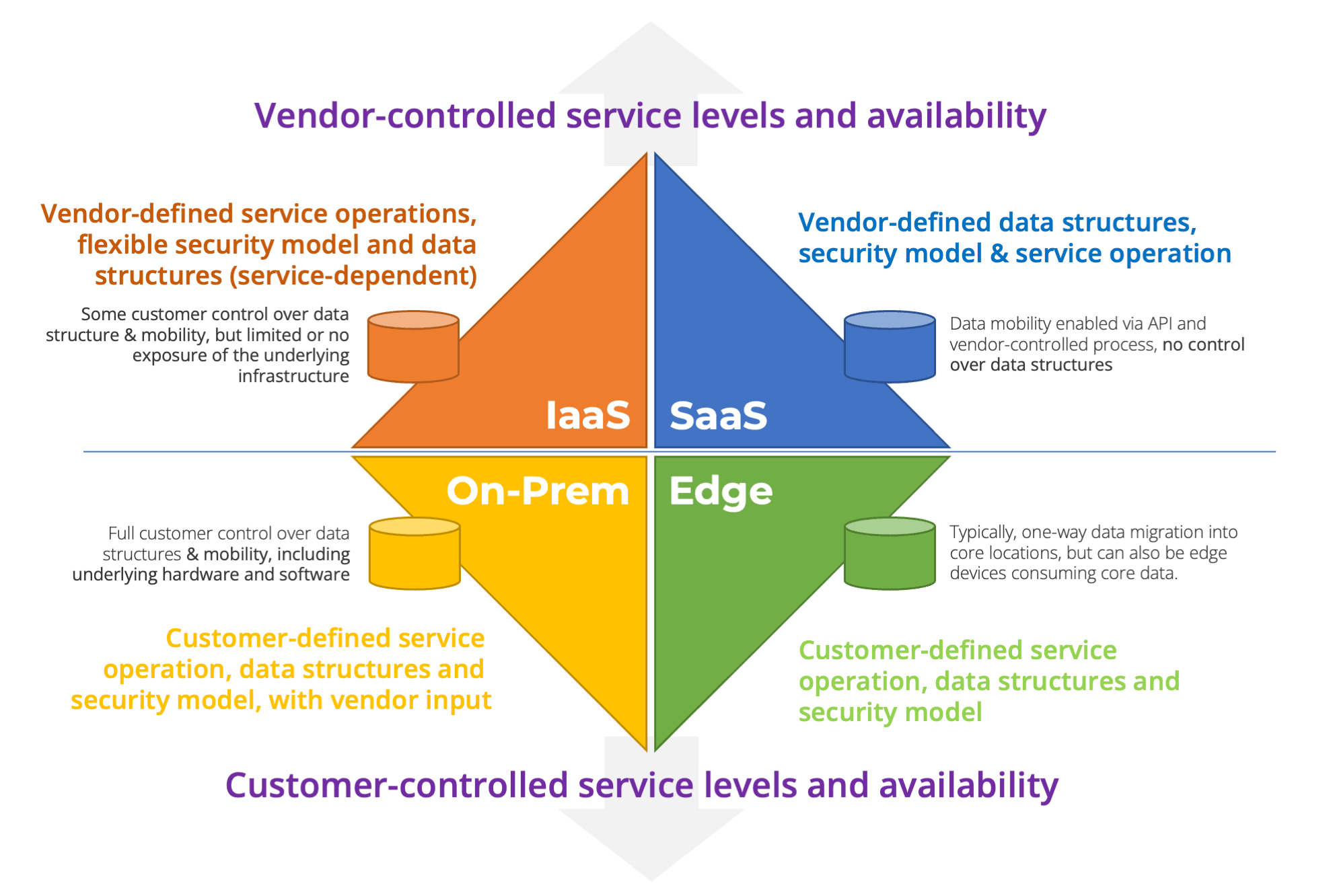
As we can see, data in the modern enterprise exists across four siloes, each of which could comprise many services.
- On-premises – private data centres or co-located equipment, but generally owned and operated by the business directly. Data is owned and managed directly by the business.
- Public Cloud – either platform or infrastructure-as-a-service (PaaS & IaaS), where virtual or physical computing infrastructure is leased/rented from a service provider. Application data is owned by the business, and in the shared responsibility model is also maintained by the business (data protection, for example). However, certain types of data (especially PaaS) could be managed and owned by the service provider (managed databases being one example).
- Edge – a mix of business edge applications and endpoint devices, such as mobiles, desktops, tablets and laptops. Data flow is generally into these devices, but many also create data that must be managed and protected.
- SaaS – application platforms delivered to the business with a unique model of data ownership. While the customer owns their data, the structure of that data within the application is governed by the SaaS provider, with little or no application-specific data protection capabilities (except for DR) provided by the SaaS vendor.
The mix of computing platforms in a typical enterprise can be complex, driven by the cost and practicality of running bespoke systems compared to “off-the-shelf” solutions. For example, many businesses have moved away from hosted email services, preferring to outsource to (for example) Microsoft or Google.
Both solutions (Google Workspace and Microsoft 365) take responsibility for security, software management, application development, and capacity management. The customer gains the benefit of cost alignment to business requirements, paying per seat rather than buying servers & software. However, from a data perspective, emails (for example) are locked into a proprietary format but still need to be protected by the customer from common loss scenarios.
Shared Responsibility
Our last comment touches on a critical differentiator between each of the locations in which modern enterprise business data exists. With on-premises systems, ownership and responsibility is unambiguous. The business owns the data and is responsible for ongoing security and data protection.
At the edge, similar logic exists, as generally, this technology is owned by the business. However, it may not always be clear what data needs to be protected at the edge. Systems creating data will (probably) need that information protected in some form. In addition, edge systems may have specific customisations, including security and credentials settings. These form part of the configuration and data protection ecosystem.
In the public cloud, platforms such as AWS, Azure, and GCP, will protect data to the extent of system failure. If a major incident occurs, cloud platforms will typically return systems back to the point of failure. However, they will not routinely protect application data or the configuration data used to define and configure PaaS systems or (for example) security credentials.
The ”Shared Responsibility Model” quoted by most vendors establishes a division of ownership that puts the responsibility for data protection onto the customer. This is only fair; a cloud vendor with millions of customers has no idea how valuable your data is to your business, how often it changes or what service levels should be applied to data protection. Remember also that if a cloud platform should fail, there will be no priority order for recovering applications. The cloud vendor will recover infrastructure first and applications second, most likely based on which customers shout the loudest (or pay the biggest bills).
Data Landscape
What does all this mean for the modern enterprise? Firstly, we can see that critical business data could exist in myriad different locations, each of which has unique service levels, data protection and security policies. It is entirely possible that most companies aren’t aware of exactly where critical data assets exist and how important they are to daily business operations. This could mean something as simple as a critical spreadsheet but could be more deeply integrated into the business, such as a SaaS application that manages the company stock inventory.
The walled garden of the mainframe era is a thing of the past. Today we need to look at a business as a virtual data centre, with many physical locations, some of which are owned, some leased, some self-managed and some vendor operated. It’s a complicated picture for even the smallest of businesses.
| IaaS | SaaS | On-Prem | Edge | |
| Architecture | Vendor-defined, component-level architecture. Customer has flexibility to use the platform “building blocks” to build solutions. | Vendor-defined architecture with little or no customer flexibility to impact/affect the architecture. | Customer-defined architectures built around vendor products, high flexibility to build custom architecture. | Customer-defined architectures built around vendor products, high flexibility to build custom architecture. |
| Upgrades & Maintenance | Determined by the vendor, some advanced notice on structural (e.g. API) changes, but new features/functionality typically implemented automatically. | Determined by the vendor, some advanced notice on structural (e.g. API) changes, but new features/functionality typically implemented automatically. | Customer-defined, with vendor recommended upgrades & feature enhancements, based on product changes. | Customer-defined, with vendor recommended upgrades & feature enhancements, based on product changes. |
| Data Accessibility | Front-end access to data through traditional storage protocols and structured databases. No external access to lower-level API or data management functions. | Data access through APIs, vendor-defined workflows and interfaces. No external visibility of internal structures or low-level access. | Full access to data at low levels, including tiering, data placement, capacity management and problem management functions. | Full access to data at low levels, including tiering, data placement, capacity management and problem management functions. |
| Data Management | Vendor-controlled implementation of snapshots and data services, including encryption & data savings. | No access to data management features. | Fully accessible by the customer, with granularity at hardware and software layers. | Fully accessible by the customer, with granularity at hardware and software layers. |
| Data Protection | Vendor-provided snapshot functionality and some backup tools. Data typically stored in local format within internal storage solutions. | Little or no data protection offerings, depending on platform. Vendor APIs for customers to protect data externally with self-managed processes. | Responsibility of the customer, with full control over data protection processes and secondary data. | Responsibility of the customer, with full control over data protection processes and secondary data. |
Building a Strategy
How can any business reconcile the use of many applications and infrastructure solutions with the issues of keeping data safe and secure? Ultimately, the benefits of using SaaS, PaaS and IaaS outweigh the issues of data management because these solutions provide significant opportunities for businesses to reduce costs and be more agile and competitive. As a result, it is incumbent on IT teams to provide a comprehensive data management strategy for data wherever it sits in the application continuum.
Although detailing a comprehensive data strategy is outside the scope of this article, we can point at some high-level strategies that all businesses should take.
Step 1 – Know Your Data, Know it’s Value
As we have highlighted, data may exist in myriad systems. The obvious first step in building a strategy is to identify all business-related data and rank it for criticality. Exactly how this rating should be assigned is business-specific. But some questions to ask include:
- Can my business operate without this data? If not, what will stop; sales, back-end operations, HR?
- Can I create my data from another source? How “unique” is my data? For example, data from customer website interactions or from sensors or logistics tracking may be non-recoverable. Even small volumes of data may represent thousands of hours of evolution.
- What data pipelines use my data? This also means data moving within platforms and cross-platforms (such as on-premises to public cloud).
- What rate of change or creation cadence do I have for my data?
- What regulatory restrictions are there on my data? Are there industry-specific requirements to keep my data for a fixed time period or to report on any data breach?
This first data mapping exercise can be quite time-consuming, especially with SaaS applications. However, it is critical to complete and to align business processes with data and data flows, particularly where applications exchange data and possibly transform it over time.
Step 2 – Align Service Levels to Data
Which applications are needed to run your business? Before the widespread adoption of SaaS, a typical recovery plan might start with infrastructure (DNS, DHCP, Active Directory), then move quickly onto email systems and then critical applications. Today, businesses will likely not experience a “widespread DR incident” simply due to the diversity of platforms on which data is stored. Therefore, typical dependency trees may not start with the obvious infrastructure components but, at the same time, may be more complex.
As a result, rather than a simple “pyramid” of application recovery dependencies, a modern mapping may have multiple towers by infrastructure providers, with dependency links between each, some of which may be one-directional. Part of this work will be to apply common SLAs for recovery time and recovery point objectives.
Step 3 – Understand Platform Recovery Processes
While this may seem an obvious point, many businesses are unaware that (for example) an IaaS or SaaS provider will not implement backups for customer data. Total loss is generally covered, while “user error” is not. However, this position is not guaranteed, as customers experienced with the OVHcloud fire in 2021 at its Strasbourg (SBC2) data centre. In total, the data and backups for 30,000 servers were lost because both were stored in the same facility.
Application data backup and recovery is not a simple process. Many solutions (including SaaS), for example, may not offer granular recovery of individual records or “business objects”. This can result in a restore process being more disruptive than simply re-creating lost data, if the update rate of an application is particularly high (or the data cannot be recreated manually).
If you currently have backup capabilities for SaaS or IaaS platforms, check the options for recovery to see how frequently backups are taken and what level of granularity is in place. If you have no backups being taken, it is worth examining the capabilities of vendor solutions with respect to exactly how the backup/recovery process works.
Step 4 – Build a Third-Party System of Record
How do you identify current and historical data and applications? How do you know on which infrastructure platform your application is currently running, or was running three months previously? We cannot rely on infrastructure itself to answer these questions and need a separate inventory to track application deployments. This process could be performed by a backup solution or infrastructure orchestration and management platform.
Remember that although an application resides in one location today, it may not be in the same place tomorrow. Applications and data are much more portable than ever before, driven by the capabilities of the cloud and the need to optimise performance and cost.
Step 5 – Consider Data Mobility in Application Choice
IaaS and SaaS platforms create a degree of lock-in that businesses choose to accept, but that comes with compromises. The internal data structures of SaaS platforms, for example, aren’t exposed to the customer. Instead, data is made available through advertised APIs. It is critical, therefore, to ensure that your SaaS vendor offers data manipulation capabilities through programmatic interfaces, as it is those mechanisms that enable backup and restore.
Once again, detail and granularity matter. Data should be accessible at an “object” level (for example, an email or document), rather than being a physical snapshot or dump of the underlying application hardware or software. We should qualify that SaaS data will be the least portable generally impossible to directly import into another platform, unless it is stored in some industry standard and recognised format.
The Architect’s View®
As the technology world has benefited from diversity and the disaggregation of the mainframe era, so the complexity of data and data flows has increased. Businesses now deploy applications on platforms where the data structures are fully exposed (such as on-premises) or mostly obfuscated from view (SaaS). But the underlying message here is clear. You cannot rely on infrastructure vendors to protect your critical assets, even on managed platforms.
As the value of business data increases, especially with the advent of AI, storing and protecting data will become even more critical and complex. AI is speeding up the rate of innovation and the pressure on IT to deliver in competitive situations, which means the tactical use of short-lived infrastructure configurations that must still manage data effectively.
This article is only meant to provide a flavour of the challenges experienced in modern enterprise data management. If you would like to understand more about the issues or need some assistance, we are always available to consult and advise new and current customers.
Copyright (c) 2007-2025 – Post #49c2 – Brookend Ltd, first published on https://www.architecting.it/blog, do not reproduce without permission.